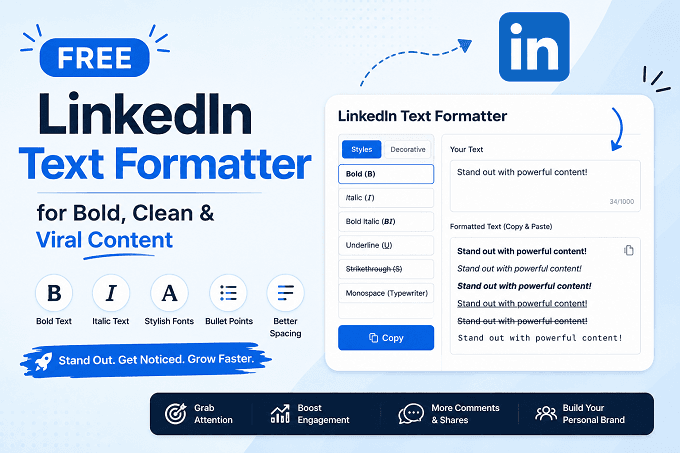
LinkedIn has become one of the most powerful platforms for professionals, creators, recruiters, and businesses. Every day, millions of users publish content to build personal brands, generate leads, and increase engagement. However, with so much content appearing in the feed, standing out is becoming more difficult than ever.
This is where a LinkedIn Text Formatter becomes essential. A properly formatted LinkedIn post can instantly capture attention, improve readability, and encourage users to stop scrolling and engage with your content.
If you want to create eye-catching posts with bold text, stylish fonts, spacing, and clean formatting, using a Free LinkedIn Text Formatter Tool can completely transform your content strategy.
In this guide, we will explain how LinkedIn text formatting works, why it matters, and how you can use it to create professional and viral LinkedIn content in 2026.
What Is a LinkedIn Text Formatter?
A LinkedIn Text Formatter is a tool that helps users’ style and structure LinkedIn content using special Unicode characters and formatting styles. These tools allow you to create:
Bold text
Italic text
Stylish Unicode fonts
Bullet points
Structured paragraphs
Clean spacing
Attention-grabbing headlines
LinkedIn itself offers limited formatting options. That is why professionals use a Free LinkedIn Text Formatter Tool to make their posts visually appealing and easier to read.
Formatted posts often perform better because they help important information stand out quickly.
Why Formatting Matters on LinkedIn
Most LinkedIn users scroll rapidly through their feeds. If your content looks like a long block of plain text, users may skip it immediately.
Good formatting helps by:
Improving Readability
Short paragraphs, bullets, and highlighted text make your content easier to consume.
Increasing Engagement
Well-structured posts can attract more likes, comments, and shares.
Building Professional Branding
Clean formatting makes your posts appear polished and professional.
Highlighting Important Information
Bold or styled text helps readers focus on key points.
Boosting Content Performance
Visually attractive posts often generate higher retention and interaction rates.
This is why creators, marketers, recruiters, and entrepreneurs increasingly rely on tools like the Free LinkedIn Text Formatter Tool to optimize their posts.
Features of a Good LinkedIn Text Formatter
Not all formatting tools offer the same experience. The best tools provide simple, fast, and clean formatting options without affecting readability.
Here are some important features to look for:
Bold and Italic Formatting
Highlight key phrases and make headlines more noticeable.
Unicode Font Styles
Create stylish text that stands out naturally in the LinkedIn feed.
One-Click Copy Feature
Quickly copy formatted text and paste it directly into LinkedIn.
Mobile-Friendly Design
A responsive interface helps users format posts on any device.
Free Access
A reliable Free LinkedIn Text Formatter Tool should not require subscriptions or complex registration.
Clean Output
Formatting should remain professional and readable, not overly decorative.
How to Use LinkedIn Text Formatter Effectively
Formatting is powerful but overusing it can reduce professionalism. Here are some practical tips for getting the best results.
Use Bold Text Strategically
Highlight important ideas, CTAs, or opening hooks.
Example:
Want more LinkedIn engagement in 2026?
Keep Paragraphs Short
Short paragraphs improve readability on mobile devices.
Use Bullet Points
Bullet lists help organize information quickly.
Add White Space
Spacing between sections makes posts look cleaner and less overwhelming.
Avoid Excessive Styling
Too many font styles can make content difficult to read.
The goal is to improve clarity while maintaining a professional appearance.
Best Ways to Create Viral LinkedIn Posts
Using LinkedIn Text Formatter is only part of the strategy. Content quality still matters most.
Here are proven techniques for better LinkedIn performance:
Start with a Strong Hook
The first sentence determines whether users continue reading.
Example:
“Most LinkedIn posts fail because they are impossible to read.”
Focus on Value
Teach something useful or share actionable insights.
Use Storytelling
Personal experiences and authentic stories perform exceptionally well.
Include a Clear CTA
Encourage readers to comment, share, or connect.
Format for Scannability
Use formatting to guide readers through your post naturally.
Combining these strategies with a Free LinkedIn Text Formatter Tool can significantly improve your content visibility.
Who Should Use a LinkedIn Text Formatter?
A LinkedIn Text Formatter is valuable for many types of users:
Content creators
Recruiters
Business owners
Digital marketers
Sales professionals
Freelancers
Agencies
Startup founders
Job seekers
Personal branding experts
Anyone who publishes content on LinkedIn can benefit from better formatting and improved readability.
Why Professionals Prefer Free Formatting Tools
Many professionals prefer a Free LinkedIn Text Formatter Tool because it saves time and simplifies content creation.
Instead of manually adjusting formatting, users can instantly generate styled text that works directly on LinkedIn.
Modern tools also help maintain consistency across posts, which is important for personal branding.
Platforms like correctifyai are becoming increasingly popular because they provide quick and user-friendly formatting solutions for professionals looking to improve their LinkedIn presence.
Common Mistakes to Avoid
While formatting helps improve visibility, poor formatting can hurt readability.
Avoid these mistakes:
Using too many font styles
Writing extremely long paragraphs
Adding excessive emojis
Making every line bold
Using unreadable Unicode characters
Over-formatting professional content
The best LinkedIn posts balance visual appeal with clarity.
The Future of LinkedIn Content Formatting
As LinkedIn becomes more creator-focused, formatting will continue to play a bigger role in content performance.
Users are increasingly optimizing posts for:
Mobile readability
Higher engagement
Better visual structure
Professional branding
Audience retention
Tools like correctifyai are helping creators adapt to these changing trends by simplifying LinkedIn text formatting and improving content presentation.
In 2026, clean formatting is no longer optional - it is a competitive advantage.
Conclusion
Creating engaging LinkedIn content requires more than good ideas. Presentation matters just as much as the message itself.
A professional LinkedIn Text Formatter helps improve readability, increase engagement, and make posts stand out in crowded feeds. Whether you are a creator, recruiter, marketer, or entrepreneur, using a Free LinkedIn Text Formatter Tool can help you publish cleaner, more impactful content.
By combining strong writing with smart formatting strategies, you can create LinkedIn posts that attract attention, encourage interaction, and strengthen your professional brand.